 open
JSON Viewer Online, Formatter and Editor
A free JSON viewer online: open a JSON file or paste JSON, explore it as a tree, a table or formatted code, validate it and fix errors by line and column, then pretty print and download it. Your JSON never leaves your device.
How it works: open a JSON file online, format and edit it
Drop, paste or try a sample
Choose or drop a .json file, paste JSON with Ctrl+V, or try the sample. It is read in your browser, so API responses, configuration files and other private data are never uploaded.
Text and tree side by side
The text sits next to a collapsible tree (or a table for a list of objects) and an inspector; selecting a node in one shows it in the other. Search keys and values, or type a path such as $.orders[*].total.
Validate and repair
Validate shows the result with the size, keys, values and depth. If the JSON is not valid you see the line and column, and Repair fixes comments, trailing or missing commas, single quotes and unquoted keys.
Format and edit
Type in the text, or use the tree and the inspector. Format with 1, 2, 3, 4 or 8 spaces or a tab, minify, sort keys, and change, add, duplicate, move or delete nodes. Long numbers are kept exactly.
Download your JSON
Use the Download button to save the result. The original file on your device is never changed.
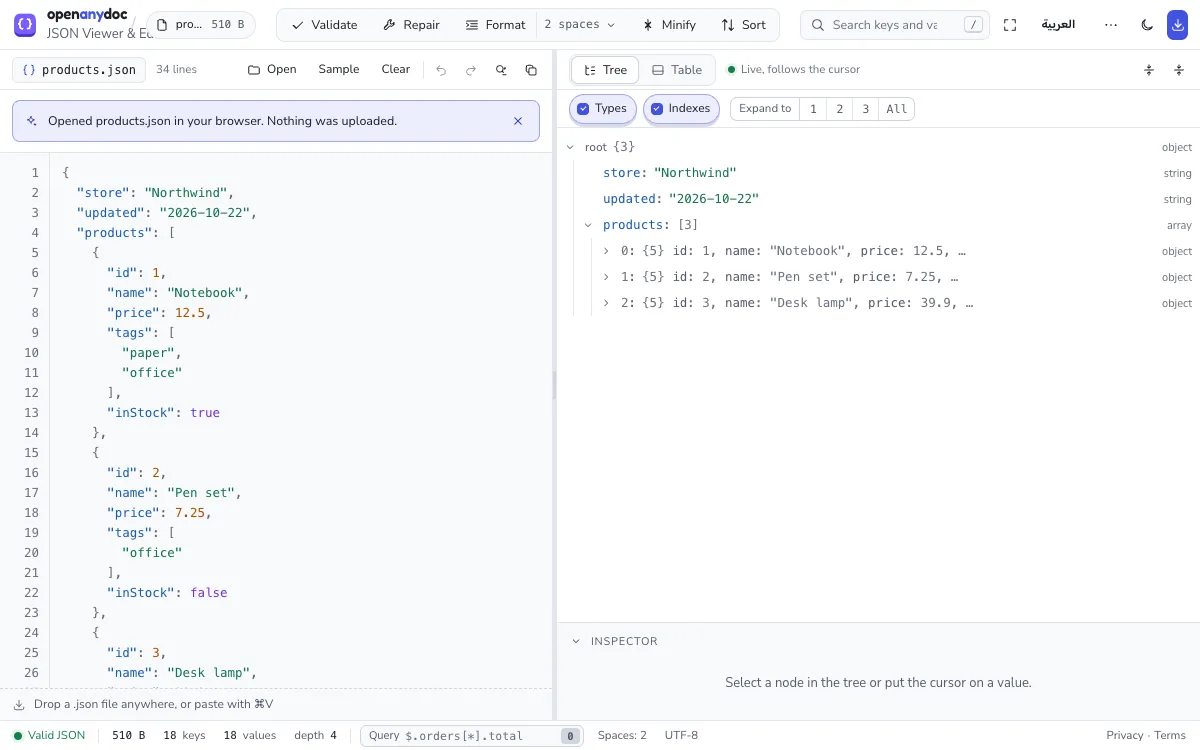
What the JSON tree viewer handles: files and pasted JSON
- Input: .json files, or JSON pasted with Ctrl+V; a list of objects can also be shown as a table.
- Size: up to 10 MB; larger files are refused before they are read. Above 5 MB the text pane starts closed.
- Numbers: integers longer than JavaScript can hold (beyond 2^53) are kept exactly.
- Errors: the line and column of the problem, and Repair for comments, trailing or missing commas, single quotes and unquoted keys.
- Editing: in the text or the tree; change, add, duplicate, move or delete nodes, format with 1 to 8 spaces or a tab, minify and sort keys, with undo.
- Saving: a .json file in the layout you chose.
JSON viewer compared with Excel Online, Google Sheets and upload-based viewers
| OpenAnyDoc | Excel Online or Google Sheets | Upload-based online viewers | |
|---|---|---|---|
| Your file is uploaded | No. It is read in your browser. | Yes, to Microsoft or Google servers. | Yes, to the service's server. |
| Account or sign-in | None. | A Microsoft or Google account. | Often none; sometimes an email address. |
| Edit and save | Yes. Download keeps the file's own format. | Yes, in the cloud copy. | Often view only. |
| Works without a network once loaded | Yes. | No. | No. |
| Size | Up to 10 MB; the text pane starts closed above 5 MB. | Set by the service. | Set by the service. |
| Cost | Free, no ads. | Free with an account; paid plans for more. | Free with ads, or paid. |
JSON viewer online: common questions
- Is my file uploaded?
- No. Your browser reads and checks the JSON itself, and pasted JSON stays in the page too. Nothing is sent to a server, which makes it suitable for API responses, tokens and internal configuration. To check it yourself, see how to check that a website does not upload your file.
- Can I edit and save it?
- Yes. Type in the text or edit the tree: change, add, duplicate, move or delete nodes, format, minify or sort keys, then press Download to save a .json file.
- Is the original changed?
- No. Your edits stay in the page's memory until you download a copy, and the file on your device is never touched. Closing the tab discards the edits; if there are unsaved ones, the browser asks first.
- Is there a file size limit?
- Yes: JSON files up to 10 MB open, and larger files are refused before they are read, because every edit would make the page slow. A file of that size shows its tree in under a second; above 5 MB the text pane starts closed and opens with "Show the text".
- Does it work on mobile?
- Yes. On a phone the JSON page switches to Text, Tree and Inspector tabs instead of side-by-side panes, with the main actions in a bar at the bottom.
- Does it work offline?
- Once the page and its JSON viewer have loaded, opening and editing files need no network. It is not an installable offline app, though: the page has to be loaded online first.
- Can my company host its own copy?
- Yes. The source code is public on GitHub under the MIT licence. Build it and serve the folder it produces from any web server on your network, and the files people open still never leave their devices. Questions: support@openanydoc.com.
- How do I format, beautify or pretty print JSON online?
- Open your file and press Format, the JSON beautifier, or choose 1, 2, 3, 4 or 8 spaces or Tab from the menu next to it. The text shows the formatted result and the download uses the same layout.
- How do I minify JSON?
- Press Minify. All spaces and line breaks outside strings are removed, which makes the file smaller.
- Can it validate JSON and show where the error is?
- When the JSON is not valid, OpenAnyDoc shows what is wrong with the line and column number, and "Go to error" selects the place in the text. Repair fixes the usual hand-written mistakes (comments, trailing or missing commas, single quotes, unquoted keys, True, None and NaN) and says what it changed.
- Can I sort the keys of a JSON object alphabetically?
- Yes. Press Sort keys: the keys of every object, including the objects nested inside, are put in order from A to Z. Undo takes it back.
- Can I remove personal data from a JSON file?
- Yes. Press the mask icon in the top bar: nested keys such as customers[].email are scanned, and each can be replaced with tokens, partly hidden or removed. The masked JSON keeps its structure and its numbers. More on the Mask data page.
Why it's private: your files never leave your browser
Most online viewers upload your file to a server, so a copy of it leaves your device. OpenAnyDoc works the other way round: your browser reads the file and draws it on your screen. Nothing is uploaded, there is no account, and the file is gone from memory when you close the tab, so there is nothing for us to store, see or lose.
How we tell you about new features
Announcements are based on the release date shown to everyone, and nothing is stored on your device or sent anywhere.