 open
Open TXT File Online: Free Text Viewer and Editor
Open TXT file online in your browser and read or edit it like a notepad online: search, line numbers, and tools for lines, whitespace and case, with Arabic text shown right to left. Your file never leaves your device.
How it works: open TXT file online and edit it
Drop your .txt file on the page
Choose or drop a text file, such as notes, a log or a list. It is read in your browser, never uploaded, and opens ready to edit.
Type, or pick a tool from the ribbon
Type in the text, or open a tab (Lines, Clean, Case, Find, Analyze, View, File) and click a tool: sort, de-duplicate, number or join lines, trim spaces, change case. With text selected, a tool changes only the selected lines. Each tool is one undo step.
Find, replace and check
Press Ctrl+F (or /) to find and replace, with match case, whole word and regular expressions. Statistics count words, sentences and reading time, and Compare shows every change against the original file.
See what is hidden
Show hidden characters to spot tabs, trailing spaces, zero-width characters and line endings, then remove them with the Clean tools. Bookmarks and Go to line help in long files.
Download your text file
Click Download and choose UTF-8, UTF-8 with BOM, UTF-16 or Windows-1256, and LF, CRLF or CR line endings. The original file on your device is never changed.
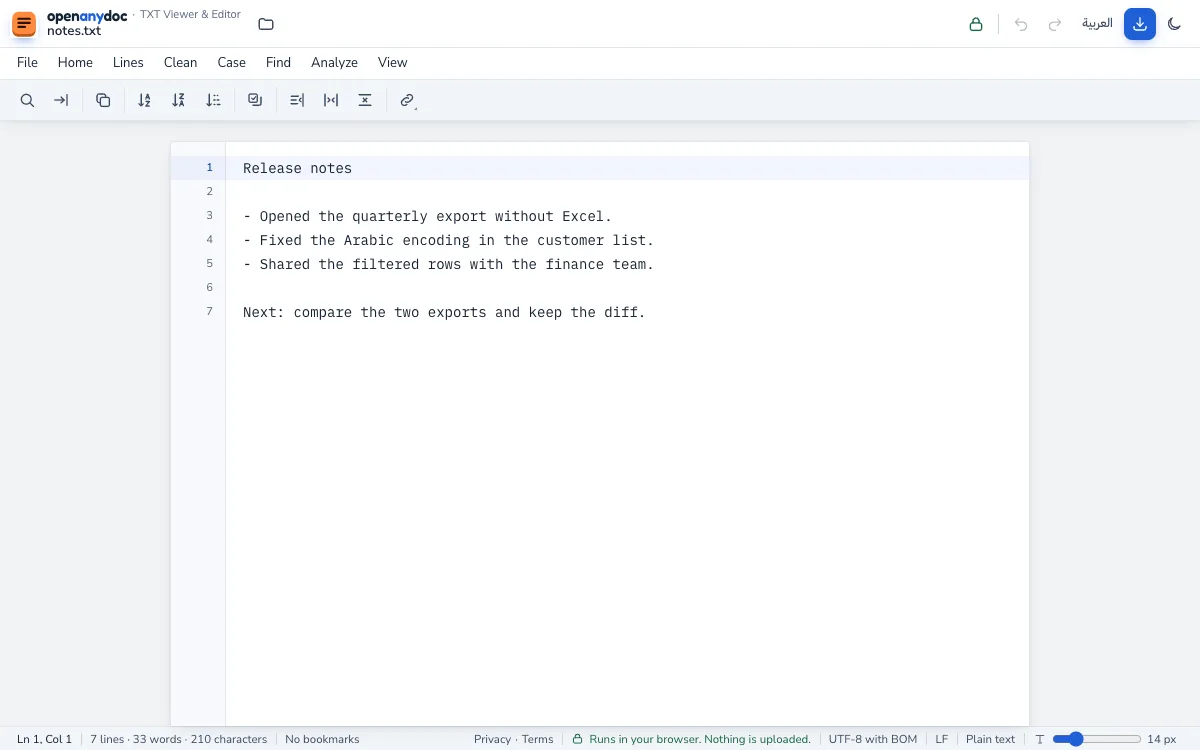
What the text file viewer handles: TXT files
- Files: plain text .txt files, such as notes, logs and lists.
- Encodings: UTF-8 with or without a BOM, UTF-16, and Windows-1256 for older Arabic text; you can reopen a file with another encoding, and each line shows in its own reading direction.
- Size: a 46 MB text file has been tested; files over 50 MB show a warning first, and above about 2 million characters the file opens in a fast read view.
- Editing: typing, plus tools for sorting, duplicates, numbering, whitespace and case, find and replace with regular expressions, statistics and compare.
- Saving: UTF-8, UTF-8 with BOM, UTF-16 or Windows-1256, with LF, CRLF or CR line endings.
Text editor compared with Excel Online, Google Sheets and upload-based viewers
| OpenAnyDoc | Excel Online or Google Sheets | Upload-based online viewers | |
|---|---|---|---|
| Your file is uploaded | No. It is read in your browser. | Yes, to Microsoft or Google servers. | Yes, to the service's server. |
| Account or sign-in | None. | A Microsoft or Google account. | Often none; sometimes an email address. |
| Edit and save | Yes. Download keeps the file's own format. | Yes, in the cloud copy. | Often view only. |
| Works without a network once loaded | Yes. | No. | No. |
| Size | A 46 MB file has been tested; a warning above 50 MB; a fast read view above 2 million characters. | Set by the service. | Set by the service. |
| Cost | Free, no ads. | Free with an account; paid plans for more. | Free with ads, or paid. |
Online text editor: common questions
- Is my file uploaded?
- No. Your browser reads the text file itself and shows it on your screen. Nothing is sent to a server, so the file never leaves your device. To check it yourself, see how to check that a website does not upload your file.
- Can I edit and save it?
- Yes. The file opens ready to edit: type, or use the ribbon tools for lines, whitespace and case, then click Download and choose the encoding (UTF-8, UTF-8 with BOM, UTF-16 or Windows-1256) and the line endings (LF, CRLF or CR).
- Is the original changed?
- No. Your edits stay in the page's memory until you download a copy, and the file on your device is never touched. Closing the tab discards the edits; if there are unsaved ones, the browser asks first.
- Is there a file size limit?
- There is no fixed limit: the limit is your browser's memory, and files over 50 MB show a warning first. A 46 MB text file shows its first lines in under half a second. A file over about 2 million characters opens in a fast read view that draws only the visible lines, and every tool still works on the whole text. Choose Edit anyway to type in it; typing in a very large file is slower.
- Does it work on mobile?
- Yes. On a phone the ribbon becomes a tools sheet and the text fills the screen, so you can read and edit text files in a phone browser.
- Does it work offline?
- Once the page and its text viewer have loaded, opening and editing files need no network. It is not an installable offline app, though: the page has to be loaded online first.
- Can my company host its own copy?
- Yes. The source code is public on GitHub under the MIT licence. Build it and serve the folder it produces from any web server on your network, and the files people open still never leave their devices. Questions: support@openanydoc.com.
- How do I change line endings (LF to CRLF) in a text file?
- Open the file and click Download, then choose LF (macOS, Linux), CRLF (Windows) or CR for the saved file. If the file mixes line endings, File and then Fix mixed line endings makes them all the same.
- How do I sort lines or remove duplicate lines in a text file?
- Open the Lines tab and choose Sort A–Z, Z–A, numeric, natural or by length, Reverse, Shuffle or Remove duplicate lines. Select some lines first to change only those; Ignore case applies to sorting and to duplicates.
- How do I find and replace text with a regular expression?
- Press Ctrl+F, turn on the regular expression button and type a pattern such as TODO: (\w+). In the replacement, $1 inserts a group, \n a line break and \t a tab. Replace all is one undo step, and you can also keep or remove the matching lines.
- How do I count the words and characters in a text file?
- The status line always shows the lines, words and characters, and the counts of the selected text. Analyze and then Statistics adds sentences, paragraphs, unique words, reading time, the most frequent words and the longest lines.
- Can I open text files with Arabic or other non-English characters?
- Yes. UTF-8 (with or without a BOM) and UTF-16 files are read directly, and a file that is not valid UTF-8 is read as Windows-1256, the old Arabic encoding. Each line is shown in its own reading direction. If the text looks wrong, choose another encoding in the File tab and reopen it.
Why it's private: your files never leave your browser
Most online viewers upload your file to a server, so a copy of it leaves your device. OpenAnyDoc works the other way round: your browser reads the file and draws it on your screen. Nothing is uploaded, there is no account, and the file is gone from memory when you close the tab, so there is nothing for us to store, see or lose.
How we tell you about new features
Announcements are based on the release date shown to everyone, and nothing is stored on your device or sent anywhere.